A downloadable tool

Buy Now$7.99 USD or more

Modulo X: Professional Modular Level Design for Godot 4.6+

Version: 1.0.1
Compatibility: Godot 4.6+ (GDScript)
License: Custom Commercial (Use in unlimited projects, no redistribution)

Stop dragging files from the FileSystem and guessing asset rotations.
Modulo X is a productivity plugin focused on Flow & Context, replacing the manual process of object placement with a dedicated dock, real-time previews, and smart alignment tools.

Designed for developers who need to build complex environments quickly while keeping hierarchy organized and collisions precise.


✨ What's New in v1.0.1

  • Fixed: Preview isolation bug - no more scene background interference
  • Improved: Professional 3-point lighting system for much better asset visibility
  • Enhanced: Preview now uses isolated World3D for clean rendering

🛠️ Core Features

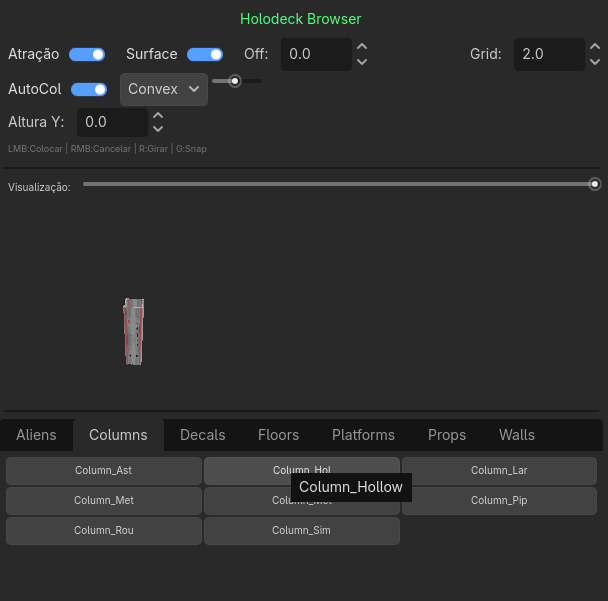
👁️ Live 3D Preview

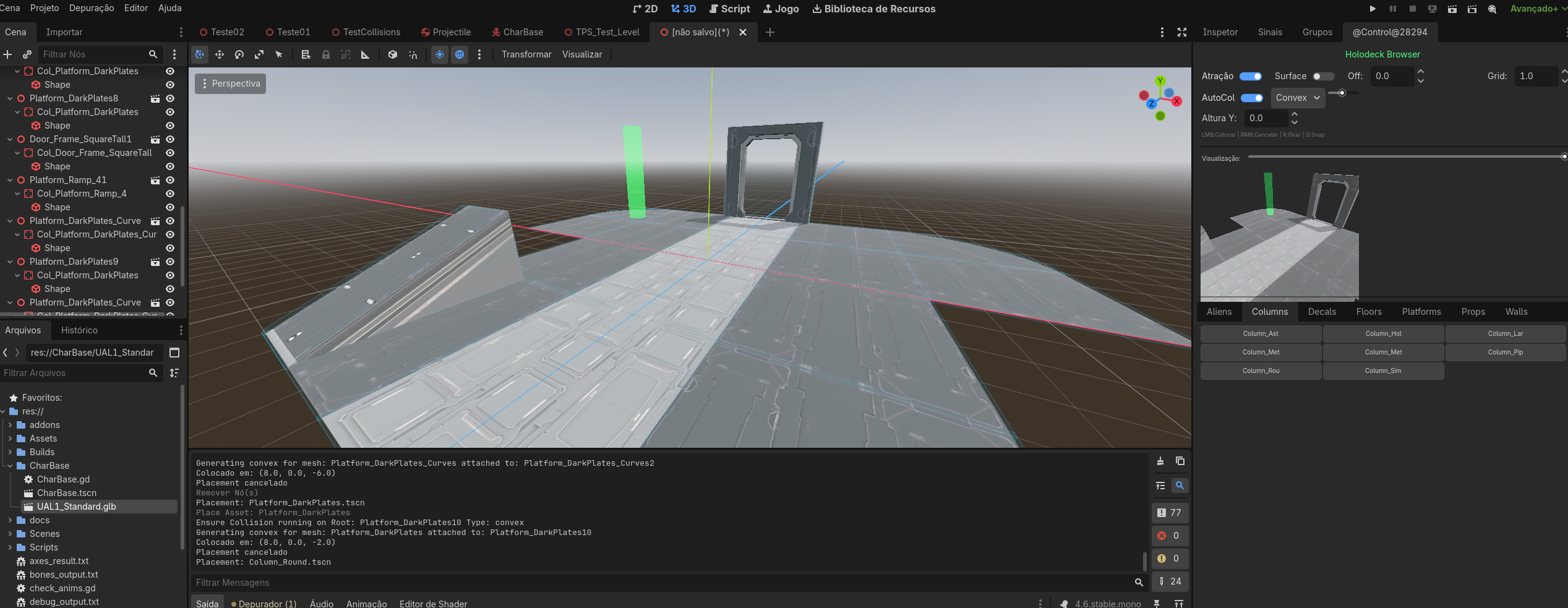
  • Real-time Preview: Hover over any asset to see the actual 3D model rotating
  • Professional Lighting: 3-point lighting system (Key, Fill, Rim) for optimal visibility
  • Isolated Rendering: Clean preview without scene background interference

📐 Smart Placement System

  • Grid Snapping: Configurable grid size (0.5 - 10.0m) with adjustable Y-height
  • Surface Snapping: Automatically detects and snaps to object surfaces
  • Ghost Preview: Transparent preview follows your mouse for precise placement
  • Quick Rotation: Press R for 90° rotation, or use scroll wheel for 15° increments

🛡️ Auto-Collision Generation

  • Instant Collision: Automatically creates collision shapes when placing assets
  • Multiple Types: Box (fast), Convex (recommended), Trimesh (precise), Multi-Convex
  • CSG Support: Works seamlessly with CSGBox3D, CSGCylinder3D, CSGSphere3D
  • Configurable Complexity: Adjust collision detail (1-10 simplification)

🎨 Holodeck Browser

  • Auto-Organization: Automatically creates tabs from your folder structure
  • Automatic Thumbnails: 128x128 previews with intelligent caching
  • Custom Asset Paths: Configure in Editor Settings > Modulo X > Asset Folders
  • Starter Content: 8 prototype assets included (Walls, Floors, Props)

🔄 Professional Workflow

  • Native Undo/Redo: Full Ctrl+Z support integrated with Godot's history
  • Geometry Scanner: Automatically detects front face and optimal camera angles
  • Non-Destructive: All operations preserve scene hierarchy and relationships

� What's Included

  • Complete Plugin: Full source code in GDScript
  • StarterContent Pack: 8 CSG-based prototype assets for immediate use
  • Documentation: Complete guides in English and Portuguese (pt-br)
  • Free Updates: All future updates included at no extra cost

🚀 Roadmap

Upcoming Features (Free Updates):

  • v1.1.0 - Brush Mode: Paint multiple objects with scatter/density controls
  • v1.2.0 - Radial Gizmo: Quick tool menu (V key) for rotate, flip, swap
  • v1.3.0 - Advanced Snapping: Vertex and edge snapping, normal alignment
  • Future: MultiMesh optimization, background thumbnail generation

📋 Requirements

  • Godot: 4.6 or higher
  • Platform: Windows, Linux, macOS
  • Assets: .tscn scenes with 3D meshes

� License Terms

Custom Commercial License

✅ You CAN:

  • Use in unlimited commercial game projects
  • Modify the plugin code for your needs
  • Sell games created with this plugin
  • Use in client projects

❌ You CANNOT:

  • Resell or redistribute the plugin
  • Include in asset packs or bundles
  • Share on public repositories (GitHub, etc.)
  • Give to other developers

Think of it like Photoshop: you can use it to create and sell your art, but you can't give/sell Photoshop itself to others.

Full license terms included in LICENSE.md


🤝 Support & Feedback

This plugin was built by devs, for devs. Found a bug or have suggestions?

  • Bug Reports: Use the comments section below
  • Feature Requests: Share your ideas - they shape future updates!
  • Documentation: Complete guides included in both English and Portuguese

Buy once, own forever. All future updates included.


📸 Quick Start

  1. Extract and copy addons/modulo_x/ to your project
  2. Enable in Project > Project Settings > Plugins
  3. Find the Holodeck Browser dock in the top-right
  4. Hover over StarterContent assets to see the live preview
  5. Click an asset and place it in your scene - collision is auto-generated!

That's it! You're ready to build.


Modulo X - Professional level design at game jam speed.

Purchase

Buy Now$7.99 USD or more

In order to download this tool you must purchase it at or above the minimum price of $7.99 USD. You will get access to the following files:

ModuloX_v1.0.1.zip 31 kB
ModuloX_v1.0.2.zip 34 kB

Development log

Leave a comment

Log in with itch.io to leave a comment.